
ROT13 Encoder / Decoder: Encode and Decode ROT13 Text Online
ROT13 is one of the simplest ways to transform readable text into a different form. It replaces each letter with the letter 13 positions ahead in the English alphabet. The useful part is simple. The...

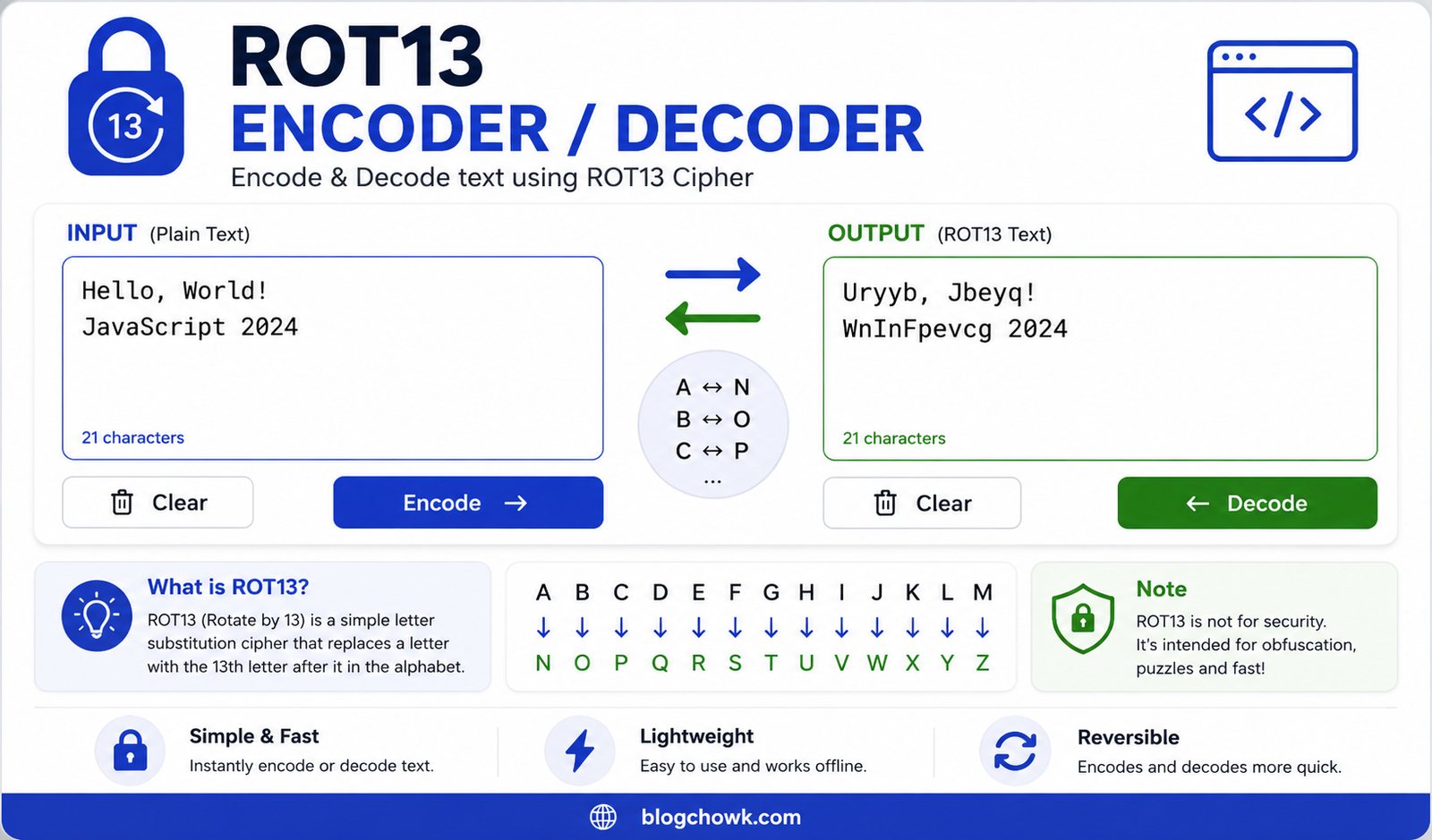
ROT13 is one of the simplest ways to transform readable text into a different form. It replaces each letter with the letter 13 positions ahead in the English alphabet.
Table Of Content
- What Is ROT13?
- How Does a ROT13 Encoder Work?
- How Does a ROT13 Decoder Work?
- ROT13 Alphabet Mapping
- Try a ROT13 Encoder / Decoder Online
- How to Create a ROT13 Encoder / Decoder in JavaScript
- How the JavaScript ROT13 Function Works
- Match English Letters
- Read the Character Code
- Keep Uppercase and Lowercase Letters Separate
- Rotate Each Letter by 13 Positions
- Convert the Result Back to a Letter
- A Shorter ROT13 JavaScript Function
- Practical ROT13 Examples
- Simple Word
- Two Words
- Text With Numbers
- Full Sentence
- Email Format
- Is ROT13 Encryption?
- Common Uses of ROT13
- Hiding Spoiler Text
- Learning String Processing
- Building Text Conversion Interfaces
- Puzzles and Challenges
- ROT13 vs Caesar Cipher
- How ROT13 Handles Numbers and Symbols
- Build a Simple ROT13 Web Interface
- Common ROT13 Coding Mistakes
- Changing the Original Letter Case
- Changing Numbers
- Forgetting Alphabet Wraparound
- Using ROT13 for Private Data
- How to Test Your ROT13 Function
- Frequently Asked Questions About ROT13
- What does ROT13 mean?
- Can the same function encode and decode ROT13?
- Does ROT13 change numbers?
- Does ROT13 preserve uppercase letters?
- Is ROT13 safe for passwords?
- Can I write a ROT13 decoder in JavaScript?
- Encode or Decode Your ROT13 Text
The useful part is simple. The same process handles both encoding and decoding. If you apply ROT13 to a piece of text, you get transformed text. Apply ROT13 again, and you get the original text back.
Here is a quick example.
Original text:
Hello WorldROT13 output:
Uryyb JbeyqApply ROT13 again:
Hello WorldYou do not need a separate decoding formula or a secret key. This makes ROT13 useful for programming exercises, puzzles, spoilers, and basic text transformation.
This guide explains how a ROT13 Encoder / Decoder works. You will also learn how to write a ROT13 function in JavaScript, test the output, preserve letter case, and avoid common implementation mistakes.
What Is ROT13?
ROT13 stands for Rotate by 13 Places. It is a letter substitution method based on the 26-letter English alphabet.
Each letter moves exactly 13 positions.
For example:
A becomes NB becomes OC becomes PM becomes ZN becomes AO becomes BZ becomes MThe same rule applies to lowercase letters.
a becomes nb becomes oc becomes pm becomes zn becomes az becomes mA standard ROT13 conversion changes English letters. Numbers, spaces, and punctuation remain unchanged.
Consider this input:
Hello, World! 123The ROT13 output is:
Uryyb, Jbeyq! 123The letters changed. The comma, space, exclamation mark, and numbers stayed in their original positions.
How Does a ROT13 Encoder Work?
A ROT13 encoder processes text one character at a time.
For each character, it checks whether the character is an uppercase or lowercase English letter. If it is, the encoder moves that letter forward by 13 positions. When the shift passes Z or z, it continues from the beginning of the alphabet.
Take the word:
JavaScriptAfter ROT13 conversion, it becomes:
WninFpevcgHere is the character conversion:
J → Wa → nv → ia → nS → Fc → pr → ei → vp → ct → gThe final result is:
WninFpevcgThe conversion is deterministic. The same input produces the same output every time.
How Does a ROT13 Decoder Work?
You do not need a separate ROT13 decoder algorithm.
The English alphabet contains 26 letters. ROT13 moves a letter by 13 positions. Running the process twice moves it by 26 positions in total, which returns the letter to its original position.
Consider the letter A:
A → N → AThe same happens with other letters:
B → O → BG → T → GM → Z → MZ → M → ZThis property applies to complete text too.
Encoded text:
Uryyb JbeyqApply ROT13:
Hello WorldA website interface may have separate Encode and Decode buttons because that is clearer for users. The underlying code can use the same ROT13 function for both actions.
ROT13 Alphabet Mapping
You can understand the full conversion by placing the normal alphabet next to the ROT13 alphabet.
Original uppercase alphabet:
ABCDEFGHIJKLMNOPQRSTUVWXYZROT13 uppercase alphabet:
NOPQRSTUVWXYZABCDEFGHIJKLMOriginal lowercase alphabet:
abcdefghijklmnopqrstuvwxyzROT13 lowercase alphabet:
nopqrstuvwxyzabcdefghijklmThe first 13 letters exchange positions with the last 13 letters.
Here is the complete pair mapping:
A ↔ NB ↔ OC ↔ PD ↔ QE ↔ RF ↔ SG ↔ TH ↔ UI ↔ VJ ↔ WK ↔ XL ↔ YM ↔ ZThis relationship explains why encoding and decoding use the same operation.
Try a ROT13 Encoder / Decoder Online
If you want to transform text without writing code, use the ROT13 Encoder / Decoder Tool.
Paste your text into the tool and run the conversion. You can use it to check short messages, test code output, or compare results while building your own JavaScript function.
For example, enter:
Meet me at 10 AM.The result should be:
Zrrg zr ng 10 NZ.Run that output through ROT13 again:
Meet me at 10 AM.Notice that the number 10 and the period remain unchanged.
How to Create a ROT13 Encoder / Decoder in JavaScript
You can build a ROT13 function with standard JavaScript methods.
Here is a clear implementation:
function rot13(text) { return text.replace(/[a-zA-Z]/g, function (char) { const code = char.charCodeAt(0); const base = code >= 97 ? 97 : 65; return String.fromCharCode( ((code - base + 13) % 26) + base ); });}Test it:
console.log(rot13("Hello World"));Output:
Uryyb JbeyqNow use the output as the next input:
console.log(rot13("Uryyb Jbeyq"));Output:
Hello WorldOne JavaScript function handles both operations.
How the JavaScript ROT13 Function Works
The function is short, but each line has a specific job.
Match English Letters
The function starts with:
text.replace(/[a-zA-Z]/g, function (char) {The regular expression matches uppercase letters from A to Z and lowercase letters from a to z.
The g flag processes every match in the string.
Numbers and punctuation do not match the expression. The replace() method leaves them unchanged.
Read the Character Code
The function then runs:
const code = char.charCodeAt(0);For the ASCII English letter ranges:
A = 65Z = 90a = 97z = 122The function uses these numeric values to calculate the rotated character.
Keep Uppercase and Lowercase Letters Separate
The next line selects a starting value:
const base = code >= 97 ? 97 : 65;Lowercase letters use 97.
Uppercase letters use 65.
This allows the function to preserve case.
Input:
HelloOutput:
UryybThe uppercase H becomes uppercase U. The lowercase letters remain lowercase.
Rotate Each Letter by 13 Positions
The main calculation is:
((code - base + 13) % 26) + baseIt performs four operations.
First, code - base converts the character into a position between 0 and 25.
Next, + 13 moves the position forward.
Then, % 26 handles alphabet wraparound.
Finally, + base moves the value back into the correct uppercase or lowercase character range.
Convert the Result Back to a Letter
The final operation uses:
String.fromCharCode(...)This turns the calculated numeric value back into a character.
The function repeats the process for each matched letter.
A Shorter ROT13 JavaScript Function
If you prefer a more compact version, you can write:
function rot13(text) { return text.replace(/[a-zA-Z]/g, char => { const base = char <= "Z" ? 65 : 97; return String.fromCharCode( ((char.charCodeAt(0) - base + 13) % 26) + base ); });}Test it:
rot13("ROT13 Encoder");Result:
EBG13 RapbqreApply the function again:
rot13("EBG13 Rapbqre");Result:
ROT13 EncoderChoose the implementation that is easiest for you and your team to understand. Clear code is easier to test and maintain.
Practical ROT13 Examples
Testing several types of input helps you understand exactly what changes.
Simple Word
Input:
HelloOutput:
UryybTwo Words
Input:
Secret MessageOutput:
Frperg ZrffntrText With Numbers
Input:
JavaScript 2026Output:
WninFpevcg 2026The digits remain unchanged.
Full Sentence
Input:
The quick brown fox jumps over the lazy dog.Output:
Gur dhvpx oebja sbk whzcf bire gur ynml qbt.The period stays in place.
Email Format
Input:
email@example.comOutput:
rznvy@rknzcyr.pbzThe letters change. The @ symbol and period remain unchanged.
Is ROT13 Encryption?
ROT13 is a reversible text transformation, but you should not use it to protect sensitive information.
It does not use a secret key. Anyone who recognizes ROT13 can reverse the text by applying the same operation.
For example:
Frperg ZrffntrApply ROT13:
Secret MessageDo not use ROT13 for passwords, private documents, API keys, authentication tokens, financial details, or confidential messages.
Use proper security methods designed for the type of information and application you are working with.
Common Uses of ROT13
ROT13 has a small set of practical and educational uses.
Hiding Spoiler Text
ROT13 can make a sentence unreadable at first glance. A reader can decode it when they choose to view the content.
This is simple concealment, not security.
Learning String Processing
A ROT13 coding exercise can help you practice several JavaScript concepts:
- Regular expressions.
- Character matching.
- Character codes.
- Modulo arithmetic.
- String replacement.
- Case preservation.
- Function testing.
The function is small enough to understand without a large codebase.
Building Text Conversion Interfaces
ROT13 works well for a basic text conversion project.
A simple interface can include an input area, conversion button, output area, copy button, and clear button.
Because the same function performs both operations, the application logic remains easy to follow.
Puzzles and Challenges
ROT13 can be used in simple text puzzles. The reader needs to identify the transformation and reverse the message.
Once the method is known, decoding is immediate.
ROT13 vs Caesar Cipher
ROT13 is a specific form of the Caesar cipher.
A general Caesar cipher can use different shift values. A shift of 3, for example, changes A to D.
ROT13 always uses a shift of 13.
That fixed shift creates its two-pass behavior:
A → N → AC → P → CM → Z → MT → G → TA Caesar cipher with another shift value may need a different reverse operation to recover the original text.
How ROT13 Handles Numbers and Symbols
Standard ROT13 changes letters from A to Z and a to z.
Numbers stay unchanged.
Input:
Password123Output:
Cnffjbeq123The same applies to common punctuation.
Input:
Hello! How are you?Output:
Uryyb! Ubj ner lbh?The exclamation mark and question mark stay in their original positions.
If a particular converter also changes digits or symbols, it is applying additional rules beyond the standard letter rotation.
Build a Simple ROT13 Web Interface
You can connect the function to a basic web page with an input field, output field, and button.
function rot13(text) { return text.replace(/[a-zA-Z]/g, char => { const base = char <= "Z" ? 65 : 97; return String.fromCharCode( ((char.charCodeAt(0) - base + 13) % 26) + base ); });}const input = document.querySelector("#input");const output = document.querySelector("#output");const convertButton = document.querySelector("#convert");convertButton.addEventListener("click", () => { output.value = rot13(input.value);});When the user clicks the button, the script reads the input, runs the ROT13 function, and places the result in the output field.
Running the result through the same function restores the original text.
Common ROT13 Coding Mistakes
A small function can still produce incorrect output. Check these areas when testing your implementation.
Changing the Original Letter Case
A correct implementation should preserve case.
Input:
HELLOExpected result:
URYYBAvoid converting the entire string to lowercase unless that behavior is part of your specific requirements.
Changing Numbers
Standard ROT13 does not rotate digits.
Input:
Test123Expected result:
Grfg123The numbers remain unchanged.
Forgetting Alphabet Wraparound
Letters near the end of the alphabet must wrap back to the beginning.
For example:
Z → MY → LX → KModulo arithmetic handles this cleanly.
Using ROT13 for Private Data
ROT13 does not protect confidential information. It can be reversed immediately without a key.
Keep its use limited to simple transformation, education, puzzles, and similar cases.
How to Test Your ROT13 Function
Create a small set of test values before using the function in an interface.
const tests = [ "Hello World", "ROT13", "JavaScript", "Test 123", "Hello!", "", "ABC xyz"];tests.forEach(text => { const encoded = rot13(text); const decoded = rot13(encoded); console.log({ original: text, encoded, decoded });});For each case, the decoded value should match the original input.
You can also test the main ROT13 property directly:
const text = "Test Message 123!";console.log(rot13(rot13(text)) === text);Expected output:
trueThis test confirms that two ROT13 operations return the supported input to its original form.
Frequently Asked Questions About ROT13
What does ROT13 mean?
ROT13 means Rotate by 13 Places. Each English letter is replaced with the letter 13 positions away in the alphabet.
Can the same function encode and decode ROT13?
Yes. Apply ROT13 once to transform the text. Apply the same process again to recover the original text.
Does ROT13 change numbers?
Standard ROT13 does not change numbers. It transforms English alphabetic letters.
Does ROT13 preserve uppercase letters?
A standard implementation should preserve letter case. An uppercase input letter produces an uppercase output letter.
Is ROT13 safe for passwords?
No. ROT13 is easy to reverse and requires no secret key. Do not use it to protect passwords or other sensitive information.
Can I write a ROT13 decoder in JavaScript?
Yes. A short JavaScript function can process each letter, rotate it by 13 positions, and preserve its case. The same function can encode and decode the text.
Encode or Decode Your ROT13 Text
ROT13 uses one clear rule. Each English letter moves 13 positions in the alphabet. Run the process a second time, and the original text returns.
If you are writing your own version, focus on correct alphabet wraparound, case preservation, and leaving unrelated characters unchanged. Test the function with uppercase text, lowercase text, numbers, punctuation, empty strings, and mixed input.
For quick text conversion, use the online ROT13 Encoder / Decoder. Paste your text, run the conversion, and use the result for testing, learning, puzzles, or other simple text transformation tasks.






No Comment! Be the first one.