
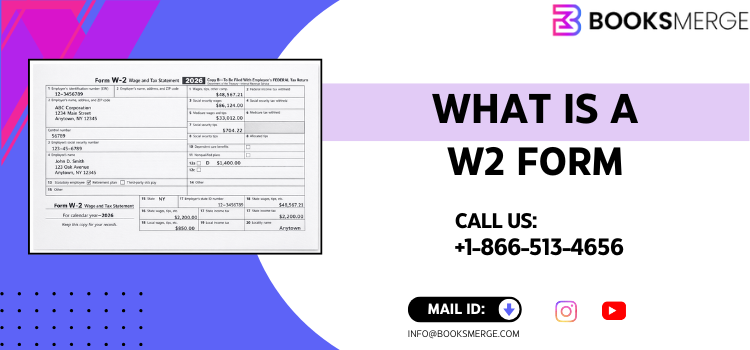
The W‑2 form is a tax statement U.S. employers issue to employees showing wages, tax withholdings, and essential info for filing taxes used with your tax return.
Table of Contents
- What Is a W‑2 Form?
- What Is a W‑2 Form Used For and Why It Matters?
- What Information Does a W‑2 Provide?
- What Does a W‑2 Form Look Like and Where to Get It?
- W‑2 Form vs W‑4 Explained
- How to Fill Out a W‑2 Form for an Employee?
- W‑2 Form 2026 Updates and Deadlines
- W‑2 Form PDF Download and Printable Options
- Common Mistakes and Tips
- Conclusion
- FAQ
1. What Is a W‑2 Form?
At its core, a W‑2 form (officially called the Wage and Tax Statement) is an IRS tax form used in the United States to report wages and the amount of federal, Social Security, and Medicare taxes withheld by an employer during the tax year.‡
When you ask what is a W‑2 form and why is it important, the answer is straightforward: without this form you can’t file an accurate tax return, nor can the IRS verify your income and taxes withheld.‡
2. What Is a W‑2 Form Used For and Why It Matters?
The W‑2 form is used for taxes and is essential for both employers and employees. Employers must file it annually with the Social Security Administration (SSA) and give employees a copy for their own tax filing.‡
For employees this form:
- Shows earnings for the year
- Reports federal income tax withheld
- Shows Social Security and Medicare contributions
- Helps prepare your tax return accurately
It even affects Social Security benefits since the SSA uses your reported annual earnings to calculate your future benefits.‡
So if you’re asking what is a W‑2 form for taxes, it’s this key document used to verify your income and tax payments when you file with the IRS.
3. What Is a W‑2 Form and What Information Does It Provide?
A W‑2 form is packed with information you’ll need to complete your tax return. Here’s what it typically shows:‡
- Your total wages (Box 1)
- Federal income tax withheld
- Social Security wages and tax withheld
- Medicare wages and tax withheld
- State and local tax info if applicable
- Retirement contributions and sometimes other benefits
If a title like what is a W‑2 form called confused you, know that “W‑2” is simply the IRS designation — and yes, it’s as fun to say as it is to file. (Well, maybe not fun.)
4. What Is a W‑2 Form Look Like and Where to Get It?
So what does a W‑2 form look like? In a nutshell, it’s a multi‑copy document with numbered boxes corresponding to specific data (wages, taxes, etc.).
You’ll typically receive several copies:
- Copy B for your federal tax return
- Copy C for your records
- Copy 2 for state tax returns
- Employer keeps Copy A for filing with the SSA
In modern times a w2 form PDF printable version is common. Employers often issue digital W‑2s that you can download and print at home if needed.
If you need an IRS blank form to view or print, the IRS provides fillable PDF versions on their site.‡
5. What Is a W‑2 Form vs W‑4?
Many people confuse W‑2 with W‑4 because their names look similar. But here’s the big difference:
- W‑4 Form is filled out by the employee when hired to tell the employer how much tax to withhold from paychecks.
- W‑2 Form is completed by the employer after the tax year to show what was paid and withheld.
So if you ever wonder what is W‑2 vs W‑4, remember this quick rule:
W‑4 tells the employer what to withhold; W‑2 tells the IRS and you what was actually withheld.
6. How to Fill Out a W‑2 Form for an Employee?
Filling out a W‑2 correctly has to be done right or you could upset both the IRS and your payroll clerk (and nobody wants that). Below is a clear step‑by‑step:‡
- Enter the employee’s Social Security number
- Include wages, tips, and other compensation
- Report federal tax withheld
- Add Social Security and Medicare tax totals
- Include state and local wages and taxes if relevant
- Check that boxes are accurate and legible
Quick tip: Use black ink and avoid corrections on Copy A so SSA machines can easily read it. If any info changes after sending, a corrected form (Form W‑2c) must be issued.
7. W‑2 Form 2026 Updates and Deadlines
The w 2 form 2026 has some updates employers need to be aware of, including revised boxes and reporting thresholds. The IRS instructions for 2026 outline changes like how certain items are reported on Box 14.‡
Deadlines to remember:
- Employers must provide W‑2s to employees by January 31st (or early February if a weekend).‡
- Employers must file W‑2 copies with the SSA by February 1st regardless of paper or e‑filing.‡
Miss these deadlines and penalties can range from $60 to $340 per form depending on how late filings are.‡
So if you’re a business or a payroll specialist, mark your calendar early.
8. W‑2 Form PDF Download and Printable Options
Want to download W2 form or get a printable version? The IRS provides an official W‑2 form PDF on its website that employers and payroll companies use.‡
Employees can often get a W‑2 printable copy from their employer’s payroll system — many modern HR platforms let you download a PDF and print one from home.
Just be aware that if you need to mail W‑2s to the SSA or your employee, Copy A has specific machine‑readable requirements, so don’t just print any PDF you find online for filing purposes.
9. Common Mistakes and Tips
Tax professionals and accountants like BooksMerge see common blunders every season. Here are quick tips to avoid trouble:
- Double‑check Social Security numbers — one wrong digit can cause delays
- Don’t add dollar signs or commas on Copy A — machines don’t like them
- Issue corrected W‑2s promptly if changes happen
- Use secure portals for W‑2 electronic delivery but ensure employee consent
Pro tip: Keeping good records and planning ahead can make tax season feel less like a horror show.
10. Conclusion
Understanding what a W‑2 form is, how it works, and why it matters is essential for every employee and business in the USA. This form connects your wages, taxes, and the government in a way that makes filing taxes possible — and accurate.
Whether you’re trying to find a w2 form example, fill out one for your team, or just make sense of the boxes on the page, knowledge is power. And having trusted help like BooksMerge available at +1‑866‑513‑4656 means you never have to face tax season alone.
FAQs
Q1 What is a W‑2 form used for?
A W‑2 form is used to report wages and taxes withheld to both employees and the IRS for income tax filing.‡
Q2 What is a W‑2 form simple definition?
It is the Wage and Tax Statement employers provide showing total earnings and taxes withheld.‡
Q3 Can I download W‑2 form PDF?
Yes, the IRS offers a fillable PDF and many payroll systems let you download and print your W‑2.‡
Q4 What’s the difference between W‑2 and W‑4?
W‑4 tells the employer how much tax to withhold; W‑2 reports what was actually withheld.
Q5 When is W‑2 due for 2026?
Employers must provide forms by January 31 and file with the SSA by early February.‡
If you need personalized tax help or guidance preparing or interpreting W‑2 forms, reach out to BooksMerge at +1‑866‑513‑4656 for expert support.
You May Also Visit: How to fill out a 1040 form